CSS
This week, i have begun my learning of CSS, ‘cascading style sheets’. I’ve developed my understanding of the language as a tool for controlling the appearance of the web as well as learnt how to implement it into my own sites.
Its Purpose
The main purpose of the style sheet is to add an element of design to the, otherwise plain, web. Having this as its own language allows us to keep the content and the design seperate so the content can be displayed as semantically as possible thus improving the accessibility of the web.
The Basics
i have managed to write my own style sheets and apply them to my sites by learning the basic syntax of the code. Selectors for telling the browser which part of the html we want to target, and the property and value provides instruction of what we want done to the targeted element.
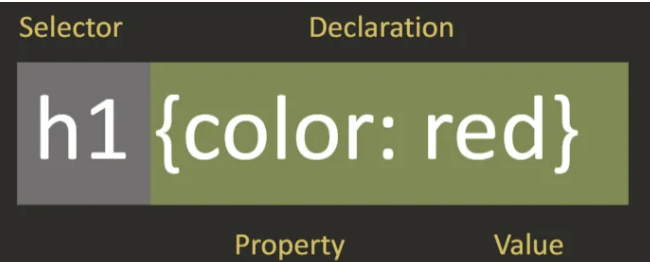
There are so many different selectors and properties to be used so I made use of sites like CSS cheatsheets to find selectors, and Codrops to browse their properties.
I also have been using the meyer reset and learning about the use and benefits of this.
The Box Model
Learning about the box model has helped me to get to grips with how CSS works and how i can visualise my ideas by shifting things around on the page.
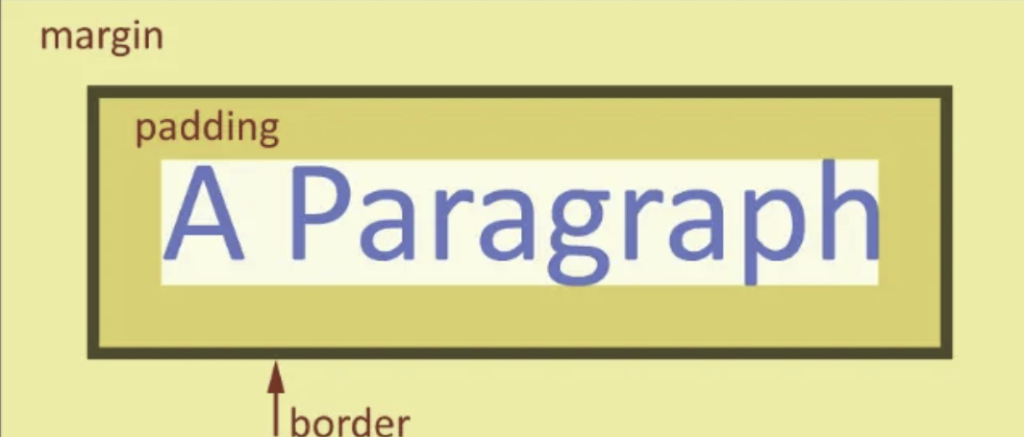
HTML Sectioning
This week, i also dug deeper into my HTML learning by finishing the ‘HTML Essential Training’ on LinkedIn. Some new semantic tags i have been making use of are the sectioning elements <header>, <main> and <footer>. I have found these particularly useful when creating my multi-page site as the header and footer can easily be repeated on each page to create a consistant, smooth user experience. It has also made my code feel a lot more organised, especially when it came to adding a style sheet as well – having these tags in my HTML made selecting certain content much easier.
Web Safe Fonts
I didn’t realise before this week, how limited the font options are when designing on the web. Some browsers can’t load certain fonts so it is important to use ‘web safe fonts’ only. I have been browsing these on w3schools.
Going Forward…
I am excited to further improve my abilities within CSS next week as I found it really fun to get started with it this week. I hope to learn more about flex boxes and grid layouts as I keep hearing about them and think they would be a useful thing to implement to gain more control over the content on my sites.
I also would really like to do some research on media queries. The the main issue I am having with my sites at the moment is their responsiveness on a mobile phone – I’m hoping media queries will resolve this issue.
Sites mentioned
- Web Safe Fonts: https://www.w3schools.com/csSref/css_websafe_fonts.php
- Meyer Reset: https://meyerweb.com/eric/tools/css/reset/
- CSS Selectors: https://dev.to/buchilazarus4/css-selector-cheatsheet-14f4
- Codrops: https://tympanus.net/codrops/css_reference/
- HTML Essential Training: https://www.linkedin.com/learning/html-essential-training-22425519
